
Our website has a fresh new look and an improved online ordering experience with Dutchie. This guide covers everything you need to know to access your account, place an order and explore the updated TXOG Rewards program, including three new loyalty tiers that unlock even greater savings throughout the year.
How to Access Your Texas Original Account
Follow these steps to access your account.
- To log in, click the “Shop Now” button at the top of the screen. You will be prompted to select a location. Choose the location you prefer to shop from, or select delivery.
- After selecting your location, you’ll be automatically redirected to that location’s product menu. From there, click the “Log In” button or the person icon in the top-right corner of the screen.
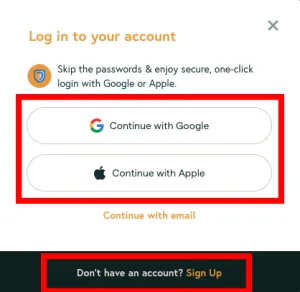
- Sign in using your Google account, Apple account, or email address. If you have not used our new ordering system yet, you’ll need to create a new account by selecting Sign Up.
- If our team created your account over the phone, select Sign Up the first time you order through our new online ordering system.
4. Once your new account is created, you can place an order, view your loyalty points and update your communication preferences.
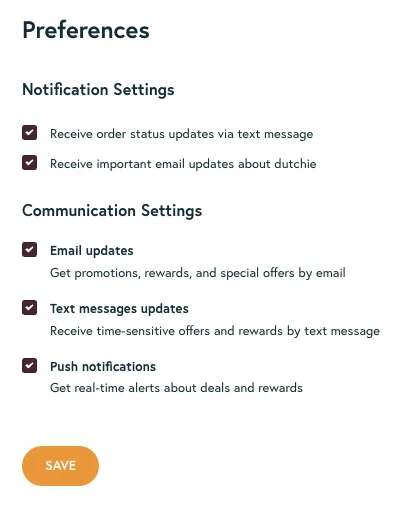
Once you’re logged in, go to the Preferences tab in your account to manage your communication settings. Be sure you’ve opted in to receive email and text message updates about your order so you don’t miss important notifications.
How to Place an Order Online
Ordering medical cannabis can be done in a few simple steps. To get started:
- Choose your location: Select your preferred Texas Original pickup location or delivery to view products.
- Add products to your cart: Explore the menu and add products to your cart.
- Select a pickup or delivery date: Choose an available pickup or delivery date.
- Choose your payment method: Pay by bank during checkout or select another available payment method. Bank payments are processed when you receive your order.
After you submit your order, our team will verify your prescription and order details. Keep an eye on your email for more details about your order.
How to Log Out of Your Account
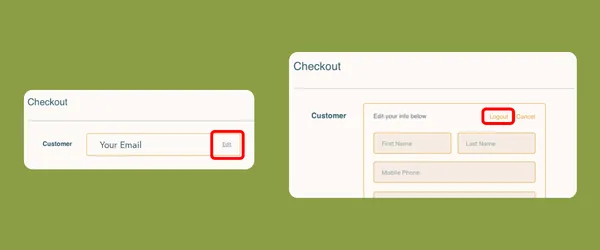
You can log out of your account from the Checkout screen.
- First, click the Shopping Cart button located in the top right of the screen, then “Proceed to Checkout.”
- Note: Add at least one item to your cart to complete this step. You will not be required to place an order.
- On the checkout screen, click the “Edit” link next to your email, then “Logout.”
Medical Cannabis Gummies: Mix & Match 4 for $90
Along with an improved online ordering experience, patients can also save on their favorite medical cannabis gummies. Choose any four eligible gummy products, combine different flavors or ratios for $90. The bundle discount automatically applies at checkout.
New TXOG Rewards Program
We’ve added more discount options to TXOG Rewards! You can now redeem 200, 300, 400 or 500 points for bigger discounts on your order. You’ll still earn 1 point for every $1 spent and can earn larger discounts based on your reward tier.
How to Earn Points
- Complete an Order: Earn 1 point for every $1 spent at Texas Original
- Refer a Friend: Earn 500 points after your referred friend completes their first order.
- Celebrate Your Birthday: Receive 100 points on your birthday.
How to View Your Points Balance
- Before you can view your points, you’ll need to log in. Click the “Shop Now” button at the top of the screen. You will be prompted to select a location. Choose the location you prefer to shop from, or select delivery. After selecting your location, you’ll be automatically redirected to that location’s product menu. From there, click the “Log In” button or the person icon in the top-right corner of the screen.
- Note: If you have not logged in to your account on the new website before, follow the steps at the top of the blog for How to Access Your Texas Original Account.
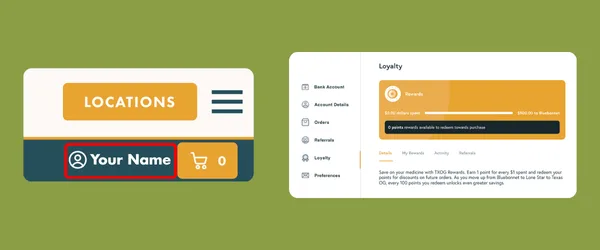
- Once logged in, click the person icon to navigate to your Account Page.
- From your account page, select the Loyalty tab. In this tab, you can see your points balance and available rewards.
What Changed with TXOG Rewards?
Patients now earn 1 point for every $1 spent instead of 1 point for every $20 spent. Every 100 points unlocks a discount, with larger discounts available as you move up TXOG Reward tiers.
Previously, spending $100 earned 5 points worth $5. Now, the same $100 purchase earns 100 points and unlocks a reward. As your annual spending increases, the Lone Star and Texas OG tiers make every 100 points worth more.
If you earn 300 points, you will have three available rewards and one reward may be applied to one eligible order at a time.
Frequently Asked Questions
Will I still be able to use my TXOG Reward points?
Yes, your existing TXOG Reward points will transfer to your new account and convert to the new point scale without losing their base reward value.
When do TXOG Reward points expire?
Points earned through purchases and referrals expire 365 days after they are awarded. Birthday points expire 60 days after they are awarded. TXOG Rewards tiers reset annually on January 1.
How do I order medical cannabis online in Texas?
Patients with a medical cannabis prescription can order online through Texas Original. Choose a pickup location or delivery, add products to your cart, select a date and choose your payment method. Our team will verify your prescription information after your order is submitted.
Why did Texas Original change ordering systems?
We introduced our new online ordering system to make it easier for patients to browse products, place online orders and manage their accounts from any device.
Can I still order from my phone?
Yes. Our new website is optimized for mobile devices, making it easier to browse and place orders from your phone or tablet.
Can I reorder products from a previous order?
Previous orders will not appear in your account, but you can browse the menu to find and reorder your preferred products. Our team can also assist in locating details from a previous order.
What payment methods are accepted for medical cannabis in Texas?
Texas Original patients can pay by bank online for a faster checkout or select another payment method. Payments are processed once you receive your order.
Has anything else changed on the new website?
Texas Original’s products, pricing, policies and team remain the same. The updates made were to our website design and online ordering platform.
What if I have questions about placing an order?
If you have questions or experience any issues while placing an order, our team is here to help. You can call us at 512-614-0343 or email us at [email protected].